
Did you know that over 76% of people who search for a local business on Google Maps visit that business within 24 hours? In a city as competitive and fast-moving as Dubai, appearing in the top three results on Google Maps — known as the Local Pack — is not just a bonus. It is one of the single most powerful drivers of foot traffic, phone calls, and sales for any local business.
Yet, despite this, thousands of Dubai businesses are completely invisible on Google Maps. Their Google Maps ranking Dubai is non-existent — a Google Business Profile sitting unclaimed, incomplete, or poorly optimised, while competitors are capturing every customer who searches for services nearby.
Whether you run a restaurant in JLT, a legal firm in Downtown Dubai, a dental clinic in Jumeirah, or a marketing agency in Al Karama — Google Maps ranking Dubai follows the same set of rules. And the good news is, those rules are learnable and actionable.
In this complete 2026 guide, you will learn exactly how Google Maps ranking Dubai works, what Google’s algorithm looks for, and the precise step-by-step actions you need to take to climb into the Local Pack and stay there. Here is what we will cover:
- What the Google Local Pack is and why it matters for Dubai businesses
- How to claim and fully verify your Google Business Profile
- How to optimise every field of your profile for maximum visibility
- Why NAP consistency can silently destroy your rankings
- How to generate genuine Google reviews the right way
- Advanced strategies for dominating competitive Dubai niches
- The most common mistakes Dubai businesses make — and how to avoid them
1. What Is Google Maps Ranking Dubai and Why Does It Matter for Your Business?
What Is the Google Local Pack?
When someone searches Google for something like “web design agency in Dubai” or “dentist near me in Jumeirah,” Google displays a special block of results at the very top of the page — a map with three business listings beneath it. This is called the Google Local Pack, or the Map Pack. Your Google Maps ranking Dubai determines whether your business appears in this coveted block or gets buried beneath your competitors.
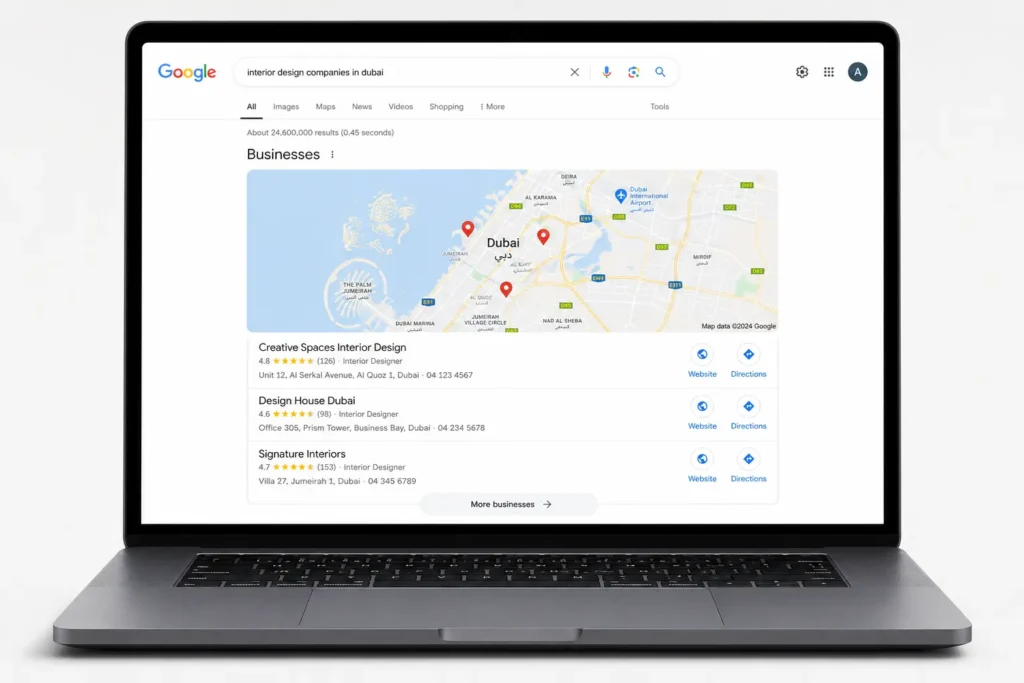
The three businesses that appear in the Local Pack receive a disproportionate share of clicks. Research consistently shows that the Local Pack captures over 44% of all clicks on local search results pages — more than all the organic blue links combined. If your business is not in those top three, you are effectively invisible to a huge portion of your potential customers.
How Much Traffic Does the Local Pack Actually Drive?
Google Maps is not just a navigation tool. In the UAE, it is the primary way consumers discover local businesses. According to Google, 46% of all searches have local intent — meaning the person is looking for something nearby. In Dubai specifically, with its dense urban environment and high smartphone penetration rate (over 95%), local mobile searches are a daily behaviour for residents, tourists, and business professionals alike.
A business that appears in the Local Pack will typically receive significantly more calls, website visits, and direction requests than one that only appears in the organic results below the map. For a restaurant, hotel, clinic, or service business in Dubai, this difference can directly translate to thousands of dirhams in monthly revenue.
Why Dubai Is a Unique Local SEO Market
Dubai presents a distinct set of challenges and opportunities for Google Maps ranking Dubai that you will not find in most other cities:
- Multilingual searches: Residents and tourists search in both English and Arabic. Optimising for both languages gives you a significant edge over competitors who only target one.
- Neighbourhood-level competition: Dubai is divided into highly distinct areas — Downtown Dubai, Dubai Marina, JLT, DIFC, Karama, Deira, JBR. Targeting the specific neighbourhood your customers search from is critical.
- Tourist vs. resident intent: Some businesses (hotels, restaurants, attractions) must rank for tourists using generic searches, while others (clinics, lawyers, schools) primarily serve long-term residents with different search behaviours.
- High business density: Dubai has one of the highest concentrations of registered businesses per square kilometre in the world. Competition in virtually every category is fierce.
The 3 Factors Google Uses to Rank Local Businesses
Google’s local ranking algorithm is built on three core signals. Understanding these is the foundation of everything else in this guide:
- Relevance: How well does your Google Business Profile match what the person searched for? This is why filling out every field of your profile — categories, services, description — is critical.
- Distance: How close is your business to the searcher, or to the location they specified in their search? You cannot control your physical location, but you can influence how accurately Google understands where you are.
- Prominence: How well-known and trusted is your business online? This is influenced by your reviews, the number and quality of backlinks to your website, your citation consistency, and your overall online presence.
2. Step 1 — Claim Your Google Business Profile (Foundation of Google Maps Ranking Dubai)
How to Create or Claim Your Google Business Profile
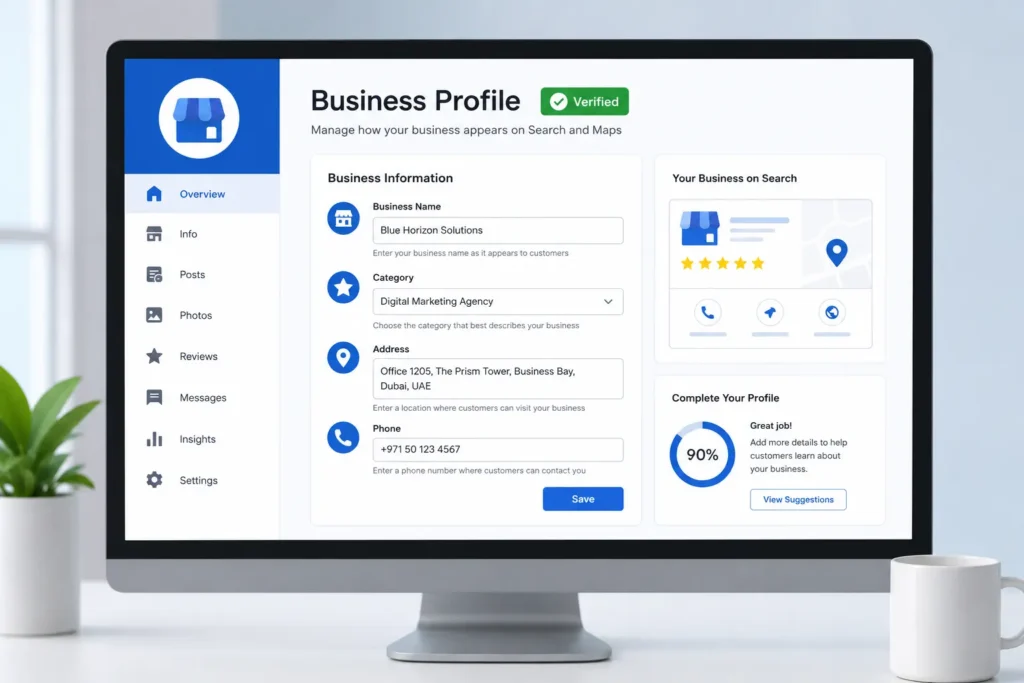
Your Google Business Profile (GBP) is the single most important asset for Google Maps ranking Dubai. Without a claimed, verified, and fully-optimised GBP, achieving strong Google Maps ranking Dubai is virtually impossible. Everything else in this guide builds on top of it. If you have not claimed your profile yet, here is how to do it:
- Go to business.google.com and sign in with a Google account associated with your business
- Search for your business name. If it already exists (Google sometimes auto-generates listings), click ‘Claim this business’
- If it does not exist, click ‘Add your business to Google’ and follow the setup wizard
- Enter your business name exactly as it appears on your trade licence — do not add keywords
- Select your primary business category carefully — this is one of the most important ranking signals
- Add your address, service area, phone number, and website URL
Choosing the Right Verification Method in the UAE
Google requires you to verify your listing before it becomes publicly active. In Dubai, the most common verification options are:
- Postcard by mail: Google sends a postcard with a verification code to your registered address. This takes 5–14 days and is the most common method. Ensure your address on GBP matches your physical premises exactly.
- Phone or SMS verification: Available for some businesses. Faster but not always offered.
- Video verification: Increasingly common in 2026. You record a short video showing your business location, signage, and equipment. This verifies both your identity and physical presence.
- Instant verification: Only available if your business is already verified in Google Search Console.
Pro Tip: Use your exact registered trade licence business name. Never keyword-stuff your business name (e.g., ‘Best Web Design Agency Dubai — Uphex Digital’). Google will flag and potentially suspend listings with keyword-stuffed names. Your name should be your actual business name, nothing more.
What to Do If Your Listing Is Already Claimed
It is surprisingly common in Dubai for a business listing to have been claimed by a former employee, an old partner, or someone who set it up on the owner’s behalf and then left. If this happens, you can request ownership transfer through Google. Go to business.google.com, find your listing, and click ‘Request access.’ Google will notify the current owner and, if they do not respond within 7 days, will grant you access.
3. Step 2 — Optimise Every Field of Your Google Business Profile
Claiming your profile is just the beginning. A half-filled Google Business Profile is almost as bad as no profile at all. Google rewards completeness — the more signals you give it, the better it can match your business to relevant searches. Here is how to optimise every single field:
Business Name
Use your exact registered business name. As mentioned, do not add descriptive keywords. Your name is a trust signal, not a keyword slot.
Business Category
This is arguably the most important field in your entire profile. Your primary category tells Google what kind of business you are, and it directly determines which searches you can appear for. Be as specific as possible. For example, if you are a digital marketing agency, choose ‘Internet Marketing Service’ rather than just ‘Marketing Agency.’ You can also add up to 9 secondary categories for additional services you offer — use them all.
Address
Your address must be precise and consistent with your trade licence. In Dubai, this means including your building name, floor number, and area. For example: ‘Al Zaroni Building, Floor 2, Al Karama, Dubai, UAE.’ Vague addresses like ‘Dubai, UAE’ reduce Google’s confidence in your location and hurt your ranking for neighbourhood-level searches.
Phone Number
Always use a UAE landline or local mobile number beginning with +971. Avoid using personal numbers that are not consistently associated with your business. This number must match exactly what appears on your website, social media profiles, and other directories.
Website URL
Link to your homepage or, even better, a dedicated location landing page if you serve multiple areas. Ensure the URL is correct and leads to a working page — broken links signal neglect to Google.
Business Hours
Set accurate hours and update them for UAE public holidays, Ramadan, and other occasions. Dubai businesses that fail to update their hours during Ramadan (when operating times change significantly) frustrate customers and lose trust signals. Use the ‘Special hours’ feature to set holiday hours in advance.
Business Description
You have 750 characters to describe your business. Use them wisely. Write a natural, engaging description that mentions your primary services and your Dubai location. Include your primary keyword naturally — for example: ‘We are a results-driven digital marketing agency offering WordPress web design Services, local SEO, and lead generation services to businesses across Dubai, UAE.‘
Do not stuff keywords. Write for humans first, Google second.
Services and Products
This is a section that the majority of Dubai businesses leave completely empty — and it is a massive missed opportunity. Add every service you offer with a title and description. Each service description is another opportunity to include relevant keywords and signal relevance to Google’s algorithm.
Attributes
Google offers a range of attributes that allow you to highlight specific features of your business. In the Dubai context, particularly useful attributes include: Arabic-speaking staff, indoor seating, free parking, wheelchair accessible, and appointment required. These attributes appear in your listing and can influence whether your business shows up for filtered searches.
Checklist: Business name | Primary & secondary categories | Full address | UAE phone number | Website URL | Accurate hours + special hours | 750-character description | All services listed | All relevant attributes selected | Q&A section seeded
4. Step 3 — NAP Consistency: The Silent Google Maps Ranking Dubai Killer
What Is NAP Consistency and Why Does Google Care?
NAP stands for Name, Address, and Phone number. NAP consistency means that your business name, address, and phone number appear exactly the same way across every single place your business is mentioned online — your website, Google Business Profile, social media, and every directory listing.
Why does this matter for Google Maps ranking Dubai specifically? Because Dubai businesses are listed across dozens of local directories, social platforms, and industry portals — and inconsistencies are extremely common. Google cross-references all these sources to verify that you are a real, trustworthy business at the location you claim. When it finds contradictions, it loses confidence in your listing and your Google Maps ranking Dubai drops as a result.
Where Your NAP Must Match Exactly
Every single one of these touchpoints must show identical information:
- Your website footer and contact page
- Your Google Business Profile
- Your Facebook Business page
- Your Instagram bio
- Yellow Pages UAE (yellowpages.ae)
- Dubizzle business listings
- Connect.ae directory
- Any other directory, press coverage, or partner website that mentions your business
The Dubai-Specific PO Box Challenge
Many businesses in Dubai use a PO Box as their mailing address, which is perfectly normal in the UAE. However, Google requires a physical street address for a Google Business Profile — a PO Box alone is not sufficient and will prevent verification. Use your actual physical office or premises address for GBP, and if you want to include your PO Box, add it in the business description, not the address field.
How to Audit and Fix NAP Inconsistencies
Use tools like BrightLocal or Moz Local to scan your business’s NAP data across the web and identify inconsistencies. Once found, log in to each directory or platform and manually correct the information. Prioritise high-authority sources first: your website, Google, Facebook, and major UAE directories.
5. Step 4 — Get More Google Reviews to Strengthen Your Google Maps Ranking Dubai
Why Reviews Are One of the Strongest Ranking Signals
Google reviews are one of the most powerful factors in Google Maps ranking Dubai. They influence all three of Google’s core ranking criteria: prominence (more reviews = more trusted), relevance (review text contains your business keywords), and engagement (higher-rated listings get more clicks, which feeds back into your Google Maps ranking Dubai position directly).
More importantly, reviews convert browsers into buyers. A Dubai business with 150 reviews at 4.8 stars will generate significantly more calls and visits than a competitor with 10 reviews at 5.0 stars, even if both rank in the same position.
How Many Reviews Do You Need to Rank in Dubai?
There is no magic number, and benchmarks vary significantly by industry and location. As a general guide for Dubai:
- Service businesses (agencies, consultants, contractors): Aim for 30–50 reviews to be competitive, 100+ to dominate.
- Restaurants and cafes: 50–100 reviews is the minimum competitive threshold in most Dubai neighbourhoods.
- Healthcare and legal: Even 20–30 high-quality, detailed reviews can be very competitive due to the trust-sensitive nature of these sectors.
How to Ask Customers for Reviews
The most effective review-generation strategy for Dubai businesses is a simple, personalised WhatsApp message sent after a positive interaction. Here is a template you can use:
WhatsApp Review Request Template:“Hi [Name]! Thank you so much for choosing [Business Name]. We really hope you enjoyed the experience. If you have a moment, we would truly appreciate it if you could leave us a quick Google review — it means the world to small businesses like ours. Here is the direct link: [short review link]. Thank you!”
Other effective methods include: placing a QR code on your reception desk, invoice, or packaging that links directly to your review page; and sending a follow-up email 24–48 hours after a service is completed.
How to Respond to Every Review
Responding to reviews — both positive and negative — is itself a ranking signal. It shows Google that your business is active and engaged. For positive reviews, thank the customer and mention your business name and location naturally. For negative reviews, respond professionally, acknowledge the concern, and offer to resolve it offline. Never argue publicly.
What NOT to Do
Never buy fake reviews. Google’s spam detection has become extremely sophisticated, and a sudden influx of low-quality reviews can trigger a manual penalty that removes your listing from Maps entirely — a devastating outcome that can take months to recover from. Do not incentivise reviews with discounts or gifts, as this violates Google’s policies.
6. Step 5 — Add High-Quality Photos and Videos
Why Photos Improve Both Ranking and Conversions
Businesses with photos on their Google Business Profile receive 42% more requests for directions and 35% more website clicks than those without, according to Google’s own data. Photos do not just improve conversion rates — they are also an active engagement signal that Google uses as a ranking factor.
What Types of Photos to Upload
Upload a diverse range of photos that tell the story of your business:
- Exterior shots — your building, signage, entrance, street view
- Interior shots — your workspace, office, shop floor, treatment rooms
- Team photos — real people build trust, especially for service businesses
- Product or service photos — before/after work, finished projects, menu items
- Behind-the-scenes — shows authenticity and culture
Photo Geotagging for Dubai Location Signals
Before uploading photos, embed GPS coordinates of your Dubai location into the image metadata. This is called geotagging. Free tools like GeoImgr allow you to add latitude/longitude coordinates to your photos before uploading them. When Google reads these coordinates and confirms they match your listed address, it strengthens your location signal significantly.
Consistency Is More Important Than Volume
Adding 100 photos all at once and then doing nothing for a year is less effective than uploading 3–5 fresh photos every month. Google interprets regular activity on your profile as a sign that the business is active and thriving — which feeds directly into your ranking.
7. Step 6 — Use Google Posts to Stay Active and Boost Visibility
What Are Google Posts?
Google Posts are short updates — similar to social media posts — that appear directly on your Google Business Profile in search results and Google Maps. They can include text, images, and call-to-action buttons. While Google has not confirmed Posts as a direct ranking factor, active posting consistently correlates with better visibility in competitive markets like Dubai.
Types of Posts and When to Use Them
- What’s New posts: Share business updates, new services, or team news. Great for keeping your profile fresh.
- Offer posts: Promote time-limited deals. Perfect for Ramadan offers, UAE National Day promotions, Dubai Shopping Festival specials, and summer discounts.
- Event posts: Promote workshops, webinars, open days, or store events with a start and end date.
- Product posts: Showcase specific products or services with a photo, description, and price.
How to Write Posts That Include Keywords Naturally
Use your Posts as an opportunity to reinforce your primary keywords. For example, a digital marketing agency in Dubai might write: ‘Looking to grow your business online in Dubai? Our local SEO packages are designed specifically for UAE businesses. Get your free audit today.’ This naturally incorporates ‘Dubai,’ ‘local SEO,’ and ‘UAE businesses’ in a way that feels genuine.
Posting Frequency
Aim to post at least once per week. Google Posts that are more than 7 days old become less prominent in your profile. Consistency here, as with photos, signals to Google that your business is active.
8. Step 7 — Build Local Citations and Backlinks for Dubai
What Are Local Citations?
A local citation is any online mention of your business’s name, address, and phone number — even without a link back to your website. Citations on authoritative directories tell Google that your business exists, is legitimate, and is located where you claim. The more consistent, high-quality citations you have, the stronger your prominence signal becomes.
Top UAE and Dubai Directories to List Your Business
Submit your business to these key UAE-specific directories as a priority:
| Directory | Best For | Priority |
| Yellow Pages UAE (yellowpages.ae) | All businesses | High |
| Dubizzle Business | Services & products | High |
| Connect.ae | All businesses | High |
| Gulf Business Directory | B2B businesses | Medium |
| Yalla.ae | Restaurants & retail | Medium |
| Bayut.com | Real estate | High (niche) |
| Expat Woman | Consumer services | Medium |
| Dubai Chamber of Commerce | All businesses | High |
| UAE Business Directory | All businesses | Medium |
| Justdial UAE | Local services | Medium |
Getting Local Backlinks in Dubai
Beyond citations, backlinks from locally relevant Dubai websites are among the most powerful ranking signals you can build. Effective strategies include:
- Dubai media coverage: Pitch stories to Gulf News, Khaleej Times, Arabian Business, or Time Out Dubai. Even a single mention on a high-authority UAE news site is worth dozens of directory listings.
- Dubai Chamber of Commerce membership: Being listed as a chamber member adds a high-authority citation and often a link.
- Event sponsorships: Sponsor local events, networking meetups, or industry conferences in Dubai. Organisers almost always link back to sponsors on their websites.
- Local blogger outreach: Dubai has a thriving community of lifestyle, business, and industry bloggers. Reaching out for features or collaborations can earn valuable local links.
9. Step 8 — Optimise Your Website for Local SEO Signals
How Your Website Directly Affects Your Google Maps Ranking Dubai
Many business owners believe that Google Maps ranking Dubai is entirely separate from their website. This is a misconception. Google uses your website as a major source of evidence when deciding your Google Maps ranking Dubai position. A strong, locally-optimised website reinforces and amplifies every other signal in your Google Business Profile.
Create a Dedicated Location Page
If you serve multiple areas of Dubai — or if you want to rank for a specific neighbourhood — create a dedicated location page on your website. This page should include: your full NAP information, an embedded Google Map of your location, your business hours, a list of your services with location-specific language (e.g., ‘web design services in Dubai Marina’), and genuine content about why you serve that area.
Embed Google Maps on Your Contact Page
Embedding a Google Map on your website’s contact page creates a direct link between your site and your GBP listing. This simple step signals to Google that the two are connected and both point to the same physical location.
Add LocalBusiness Schema Markup
Schema markup is structured data code that you add to your website to help Google understand specific information about your business. The LocalBusiness schema allows you to explicitly declare your business name, address, phone number, opening hours, and price range in a format Google can read perfectly. If you use WordPress, plugins like Rank Math or Yoast SEO handle this automatically — simply fill in your business details in their local SEO settings.
Use Location Keywords in Your On-Page SEO
Every important page on your website should include natural mentions of your Dubai location in key places: the page title tag, meta description, H1 heading, and within the body content. For example, instead of writing ‘We are a digital marketing agency,’ write ‘We are a digital marketing agency based in Dubai, UAE, serving businesses across the Emirates.’
Mobile Speed Is Non-Negotiable
Dubai has one of the highest mobile internet usage rates in the world. A slow, poorly-performing website on mobile not only frustrates users — it directly hurts your Google Maps ranking. Google’s Core Web Vitals scores are used as ranking signals for local results. Use Google PageSpeed Insights to check your site’s performance and fix the issues flagged.
10. Advanced Google Maps Ranking Dubai Strategies for Competitive Niches
Target Neighbourhood-Level Keywords
Instead of only trying to rank for ‘web design agency Dubai’ — a term dominated by well-established agencies with years of authority — also target hyper-local variations: ‘web design agency JLT,’ ‘web design services Dubai Marina,’ ‘affordable web design in Al Quoz.’ These longer, more specific searches are less competitive, have clearer buyer intent, and convert at higher rates.
Seed the Google Q&A Section
Most businesses are completely unaware that anyone — including themselves — can post questions on their own Google Business Profile. Use this to your advantage. Ask (and answer) the questions your customers most commonly ask: ‘Do you offer free consultations?’ ‘Do you serve clients across the UAE or only Dubai?’ ‘What is your typical project timeline?’ These answers appear prominently on your listing and directly address buyer objections before they even reach your website.
Track Your Google Maps Ranking Dubai Position
You cannot improve what you do not measure. Use tools like BrightLocal, Whitespark, or the free heatmap in Google Business Profile Insights to track your ranking position across different Dubai postcodes and neighbourhoods. Tracking shows you where you are winning, where you are losing, and what needs attention.
Arabic Language Optimisation
This is one of the most underutilised advantages available to Dubai businesses. A significant portion of local searches in the UAE are conducted in Arabic. Adding an Arabic version of your business description, using Arabic-language Google Posts, and getting Arabic-language reviews dramatically increases your visibility for Arabic-speaking searchers — a market most of your English-only competitors are completely ignoring.
Combine Organic Ranking with Google Local Service Ads
For highly competitive categories — legal services, healthcare, home maintenance — running Google Local Service Ads (LSAs) alongside your organic Maps ranking creates a double presence at the top of the search results page. LSAs appear above the standard Local Pack, with a ‘Google Guaranteed’ badge that dramatically increases consumer trust. In Dubai’s high-stakes service markets, this combination can be transformative.
11. Common Google Maps Ranking Dubai Mistakes That Kill Your Visibility
Avoiding these pitfalls is just as important as implementing the positive strategies above:
- Keyword stuffing the business name: Adding keywords like ‘Best Dentist Dubai’ to your business name is against Google’s guidelines and risks getting your listing suspended.
- Using a virtual office address: If you list a virtual office address where you have no genuine physical presence, you risk a listing suspension when Google’s verification team investigates. Always use a real, staffed location.
- Ignoring reviews or copy-pasting responses: Generic, copy-pasted review responses (especially on negative reviews) signal low engagement and can actually hurt your reputation more than not responding at all.
- Choosing the wrong primary category: This is perhaps the single most consequential mistake. Take the time to research exactly which category your top-ranking competitors use.
- Not updating hours during Ramadan: UAE businesses dramatically change their operating hours during Ramadan. Failing to update your GBP hours leads to incorrect information in Maps, frustrated customers, and trust damage.
- Inconsistent phone numbers: If your WhatsApp number, website number, and GBP number are all different, you are fragmenting your NAP signals and confusing Google.
- Becoming inactive: An account with no new photos, no posts, and no review responses for months sends a signal that the business may be closed or neglected. Google may reduce your visibility accordingly.
12. Frequently Asked Questions About Google Maps Ranking Dubai
How long does Google Maps ranking Dubai take to show results?
For a new or newly-optimised Google Business Profile, meaningful improvement in Google Maps ranking Dubai typically happens within 4–8 weeks in moderately competitive niches. For highly competitive categories — hotels, restaurants, law firms in prime Dubai areas — reaching the Local Pack can take 3–6 months of sustained effort. Consistency is the key driver of Google Maps ranking Dubai: businesses that actively maintain their profile, generate reviews, and build citations regularly will outpace those who optimise once and forget.
Can I rank on Google Maps without a physical office address in Dubai?
You need a verifiable physical address to create a Google Business Profile. However, if your business operates as a service-area business (you go to clients rather than they come to you), you can hide your address after verification and instead specify your service areas — for example, ‘We serve Dubai, Sharjah, and Abu Dhabi.’ Google will still rank you for searches in those areas based on your overall prominence signals.
How many reviews do I need to appear in the top 3?
There is no fixed number. What matters more than the raw count is the quality, recency, and rate of review acquisition. Ten genuine, detailed, recent reviews can outperform 200 old reviews with no responses. Focus on generating a steady, consistent stream of authentic reviews rather than a one-time burst.
Does my website ranking affect my Google Maps ranking?
Yes, significantly. A well-optimised website with strong domain authority, relevant local content, schema markup, and fast loading speeds reinforces your Google Maps ranking Dubai position. Conversely, a slow, thin, or poorly-structured website can hold back even a well-optimised GBP. Think of your website and your Google Business Profile as two pillars of the same Google Maps ranking Dubai strategy — both must be strong.
What should I do if my Google Business Profile gets suspended?
First, do not panic. Profile suspensions are relatively common and usually recoverable. Log in to business.google.com, look for any suspension notices, and read them carefully to understand the reason. Most suspensions in Dubai are caused by address issues, name policy violations, or duplicate listings. Complete the reinstatement form, provide any documentation Google requests (trade licence, utility bill, photos of your premises), and follow up consistently. If the standard process fails, consider reaching out to Google Business Profile support directly.
Can I rank in multiple Dubai areas with one listing?
A single GBP listing will naturally rank best for searches close to your physical address. To rank for multiple Dubai areas, your best strategy is: set multiple service areas in your GBP, create location-specific pages on your website, and use Google Posts to mention the areas you serve. For businesses with genuine multiple locations, create a separate verified GBP listing for each location.
Conclusion: Google Maps Ranking Dubai Takes Consistency, Not Magic
Google Maps ranking Dubai is not about tricks, shortcuts, or gaming the algorithm. It is about systematically building every signal that Google uses to decide which businesses to trust and show to local searchers. The businesses that dominate Google Maps ranking Dubai today got there through consistent, disciplined effort — and so can you.
To summarise the 8 steps covered in this guide:
- Claim and verify your Google Business Profile
- Optimise every single field — categories, description, services, attributes
- Ensure perfect NAP consistency across all online touchpoints
- Generate genuine, consistent Google reviews and respond to every one
- Upload high-quality, geotagged photos regularly
- Use Google Posts weekly to signal activity
- Build local citations in UAE directories and earn local backlinks
- Optimise your website for local SEO signals including schema markup
Each of these steps compounds on the others. A business that does all eight consistently will, over time, outrank competitors who only do one or two — regardless of how long those competitors have been in business.
Improving your Google Maps ranking Dubai does not require a massive budget or a team of specialists. What it requires is the right knowledge applied consistently. Start with the fundamentals — claim your profile, fill every field, fix your NAP, and start collecting reviews — and build from there.
Ready to rank higher on Google Maps in Dubai? At Uphex Digital, we specialise in local SEO for Dubai and UAE businesses. From full Google Business Profile optimisation to citation building and review generation strategies — we handle everything. Contact us today for a free local SEO audit.